

Most bloggers treat publishing like a finish line. They hit Publish, share the post once, then act confused when it gets six clicks and a pity-like from their aunt.
That’s why most blogs plateau.
A blog becomes a traffic engine when every post runs through a simple, repeatable process that creates multiple “touches” across the places your audience already hangs out—without you having to become a full-time content hamster.
This is the weekly promotion loop I want you running.
One post. One week. Repeat.
If you’re brand new to this whole game, start here: Start Here.
If you want the shortcuts and templates: Free Reports.
Table of Contents
Key Takeaways
- Publishing is the start. Promotion is the multiplier.
- A weekly loop beats random posting: launch → repurpose → email → community → internal links.
- Repurposing isn’t “make more content.” It’s “make the same content do more jobs.”
- Internal links are promotion. Updating older posts is how you compound traffic quietly.
- Consistency wins: one system, executed weekly, for 90 days.
Why Most Blog Posts Die Quietly After Publishing
Here’s the typical routine:
- You publish a post you worked hard on.
- You share it once.
- You get a trickle of clicks.
- You move on.
- The post gets buried.
That’s not because your post was “bad.” It’s because your post got one chance to get discovered.
A traffic engine doesn’t rely on one chance. It relies on repetition (with variation) across the week.
This sits inside your PPP system:
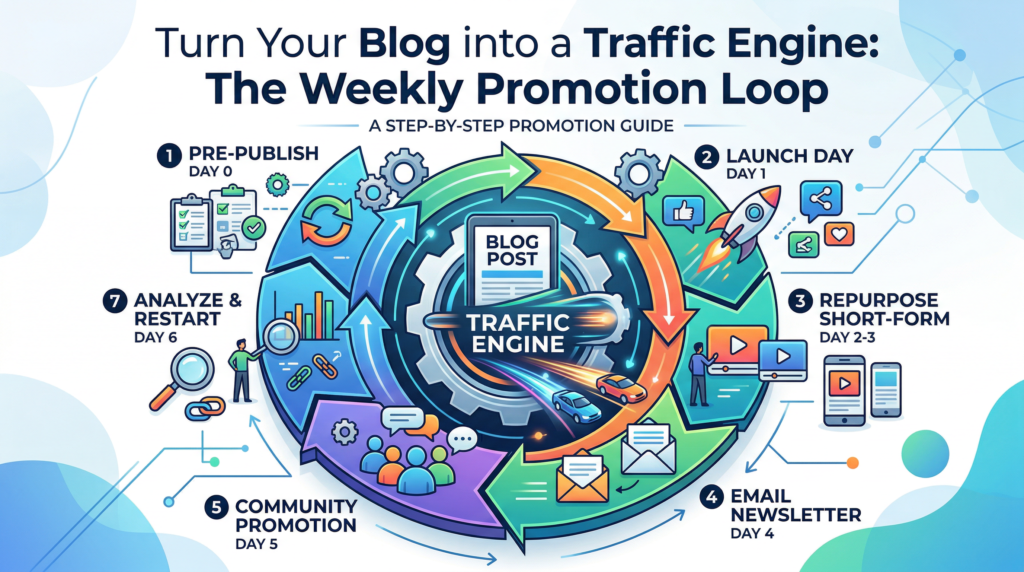
The Weekly Promotion Loop
The loop is simple:
Day 0 prep → Day 1 launch → Day 2–3 repurpose → Day 4 email → Day 5 community → Day 6 internal links + refresh
You’re not spamming the same link for six days. You’re creating six different reasons for someone to discover it.
Here’s the schedule:
| Day | What you do | The point |
|---|---|---|
| Day 0 | Prep hooks + links | Make the post easy to promote |
| Day 1 | Launch distribution | Get initial momentum |
| Day 2–3 | Repurpose into short form | Reach new people without new research |
| Day 4 | Send an email | Drive clicks from an owned channel |
| Day 5 | Start a community discussion | Pull targeted readers in naturally |
| Day 6 | Add internal links + update old posts | Compound traffic for months |
Run this loop every week for 90 days and your “traffic problem” usually turns into a “which post do I expand first?” problem.
Day 0: Before You Publish, Set the Post Up to Be Promotable
Most people try to figure out promotion after the fact.
That’s like cooking a meal and then asking, “Wait… do I own plates?”
Do these three things before you hit publish:
Write 3 hooks (not headlines)
Your headline is for search. Hooks are for humans.
Write three:
- Curiosity hook: “Most bloggers do X… and that’s why Y never happens.”
- Contrarian hook: “Stop doing X. Do this instead.”
- Outcome hook: “Do this weekly and your posts stop dying.”
Pre-pick 3 internal link targets
Open 3–5 older posts related to the new one and note:
- where a link would naturally fit
- what anchor text you’ll use
You’ll update these on Day 6.
Decide the one CTA
One post should push one next step:
- subscribe
- grab a free report
- read the next post in the sequence
- monetization path (when appropriate)
No link salad.
(If you want a simple habit to stay consistent with all of this, see: The 2-Minute Morning Rule That Quietly Moves Your Business Forward.)
Day 1: Launch Day Distribution Without Being Annoying
Launch day is not “post everywhere.”
Launch day is “post where it actually makes sense.”
Pick 2–3:
- your email list (if you have one)
- one social platform you can show up on consistently
- one community where your audience already talks
What to say:
- lead with the outcome
- mention what’s in it for them
- tell them exactly what to do next
Example:
If your posts die after Day 1, this weekly loop fixes it. Steal it and run it this week.
That’s useful. Not annoying.
If you need a place to send people when they want “the next step,” use your hub: Blog.
Day 2–3: Repurpose the Post Into Short-Form Without Starting Over
Repurposing is just format shifting.
Pull from the post you already wrote:
- 3–5 key takeaways → 3–5 short posts
- one checklist → a carousel or graphic
- one “mistake” section → a short rant post (people love those)
- one example → a quick “how-to” clip script
This is how one blog post becomes:
- multiple touchpoints
- multiple entry doors
- multiple chances to be discovered
If you’re building your blog with AI in the mix (without turning it into AI slop), you’ll like: Build Your AI-Powered Blog in 2025.
Day 4: Turn the Post Into an Email That Drives Clicks
Please don’t send: “New blog post is live!” That email dies in the inbox like a leaf.
Instead:
- open with the problem
- tease the “one thing”
- link once
- stop talking
Use this structure:
Subject: Stop letting posts die after Day 1
Body:
2–4 sentences, one link, optional P.S.
Want more subscribers so email actually matters? That’s what Subscribe is for—and why your Free Reports hub should exist.
Day 5: Community Promotion That Doesn’t Feel Like a Pitch
Community promotion is not “here’s my link.” Community promotion is: “here’s something useful… and if you want the full breakdown, I wrote it up.”
Do this:
- post the core insight in plain English
- ask a question
- add the link only if it fits naturally
Example:
What do you do after you publish? I run a 6-day loop (repurpose + email + internal links) so posts don’t die. Want the schedule?
That’s how you get clicks without becoming that guy.
Day 6: The SEO Booster Most Bloggers Ignore
This is the compounding step. Open 3–5 older posts and do two things:
Add internal links to the new post
Find a sentence where the topic overlaps and add a link naturally.
Refresh the old post slightly
Add:
- a new example
- an update note
- a small FAQ
- a paragraph that references the newer post
This signals:
- relevance
- freshness
- topical connection
Internal linking is promotion because it keeps traffic circulating inside your site instead of bouncing off into the void.
The Biggest Promotion Mistakes
Mistake: Promote once and disappear
Fix: run the loop.
Mistake: Use the same message everywhere
Fix: change the angle by platform:
- curiosity for social
- clarity for email
- discussion starter for community
Mistake: Skip internal links
Fix: Day 6 becomes non-negotiable.
Mistake: Treat every post the same
Fix: promote based on intent:
- evergreen = spread out touches over weeks
- time-sensitive = heavier Day 1–3 push
Your Next 7 Days: Turn One Post Into a Traffic Engine
Pick one post you published recently and do this:
- Day 0: write 3 hooks + pick internal link targets
- Day 1: publish + share in 2–3 places
- Day 2–3: create 3–5 repurpose pieces
- Day 4: write one tight email with one link
- Day 5: start one community discussion
- Day 6: add 3–5 internal links from older posts + refresh one older post slightly
Then follow the system:
Publish → Promote → Profit
And if you want your monetization to be as systematic as your promotion, read:
Affiliate Sales System Blueprint: From First Click to First Commission
Frequently Asked Questions
How long should I run the weekly promotion loop before judging results?
Give it 90 days. Not because I’m romantic about quarters, but because consistency compounds and you need enough reps to see patterns.
What if a post still doesn’t get traction?
Fix the top 3 things:
- title (does it match intent?)
- intro (does it answer fast?)
- internal links (is it connected to anything?)
Then run the loop again on the next post. Don’t spiral.
Can I automate the weekly promotion loop?
You can automate scheduling. You shouldn’t automate community engagement. Automation distributes—you still have to show up like a person.
Should evergreen and time-sensitive posts use the same loop?
Same loop, different intensity. Evergreen gets a slower burn. Time-sensitive gets a heavier Day 1–3 push.
What repurposing format should I start with?
Start with the one you’ll actually do consistently. Consistency beats “optimal” every time.
Conclusion
Stop treating posts like one-hit wonders.
Run a weekly promotion loop and your blog becomes an engine:
- one post becomes multiple entry points
- internal links keep traffic circulating
- your effort compounds instead of disappearing
If you want the “plug-and-play” resources that make this easier, start here: